
Local CLI Mode: Run CanForm's AI on Your Claude Code / Codex Subscription
CanForm’s AI features (per-company message generation, form discovery decisions, and verification of failed submissions) normally run on pay-as-you-go API keys. With local CLI mode, the same features run through the Claude Code or Codex CLI installed on your PC, within the subscription you already pay for (Claude Pro/Max, ChatGPT Plus/Pro, and so on).
How it works
For security reasons, a Chrome extension cannot launch programs on your PC directly. CanForm therefore uses Chrome’s official native messaging mechanism:
- A one-time command registers CanForm’s small helper program (the native host) with Chrome.
- From then on, whenever AI is needed, Chrome launches that program automatically; it runs the
claudeorcodexcommand and returns the result.
Nothing has to stay running, and there is nothing to start before each session. The registration is written to your own user profile, so no administrator rights are needed.
Requirements
- Node.js 18 or later (already present if you use Claude Code or Codex CLI)
- One of the following, installed and logged in:
- Claude Code:
claude --versionworks in a terminal - Codex CLI:
codex --versionworks in a terminal
- Claude Code:
- The CanForm folder (including the
bridgefolder) on your PC
One-time setup (about 3 minutes)
You will use a terminal, but everything is copy and paste.
1. Choose “Local CLI” in the settings
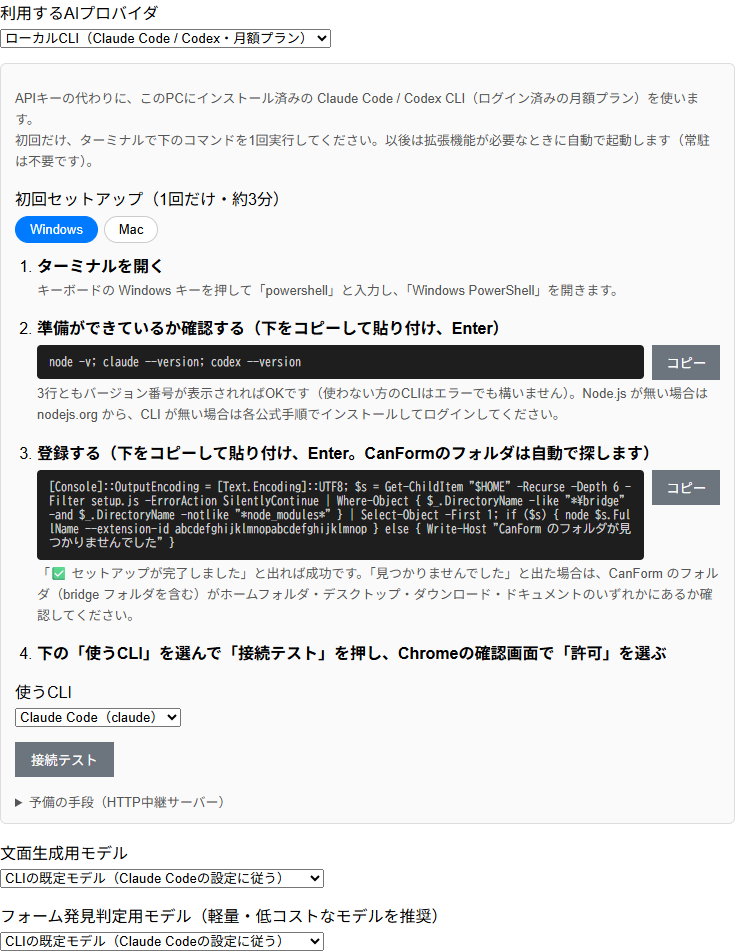
On the settings page, open the AI settings tab and choose Local CLI (Claude Code / Codex, subscription) as the provider. The page shows these steps with your extension ID already filled in — copy the commands from there (<your extension ID> below is filled automatically).
2. Open a terminal
- Windows: press the Windows key, type
powershelland open “Windows PowerShell” - Mac: press
command + space, typeTerminaland press Enter
3. Check that everything is installed
Copy this line, paste it and press Enter (same on Windows and Mac):
node -v; claude --version; codex --versionYou are ready if all three lines show a version number (an error for the CLI you do not use is fine). If node is missing, install it from nodejs.org; if a CLI is missing, install it per its official guide and log in.
4. Register (the CanForm folder is found for you)
You do not need to know where the CanForm folder is. The line below searches your home folder for bridge/setup.js and runs it. Copy, paste, Enter.
Windows (PowerShell)
[Console]::OutputEncoding = [Text.Encoding]::UTF8; $s = Get-ChildItem "$HOME" -Recurse -Depth 6 -Filter setup.js -ErrorAction SilentlyContinue | Where-Object { $_.DirectoryName -like "*\bridge" -and $_.DirectoryName -notlike "*node_modules*" } | Select-Object -First 1; if ($s) { node $s.FullName --extension-id <your extension ID> } else { Write-Host "CanForm folder not found" }Mac (Terminal)
s=$(find "$HOME" -maxdepth 7 -path "*/bridge/setup.js" -not -path "*/node_modules/*" 2>/dev/null | head -n 1); if [ -n "$s" ]; then node "$s" --extension-id <your extension ID>; else echo "CanForm folder not found"; fiYou should see output ending with:
[1/3] Checking requirements
  Node.js:          v24.4.1
  Claude Code:      2.1.289 (Claude Code)
  Codex CLI:        codex-cli 0.157.1

[2/3] Writing the native messaging host manifest
[3/3] Registering with the browser (chrome)

✅ Setup complete.
If it says the folder was not found, make sure the CanForm folder (containing bridge) is under your home folder, Desktop, Downloads or Documents. To register with another browser, append --browser edge or --browser brave. On Mac, restart Chrome after registering.
5. Test the connection and save
Back on the settings page, pick Claude Code or Codex under CLI to use and click Test connection. The first time, Chrome asks for permission to communicate with native applications — choose Allow. When you see “Connected (claude: 2.1.289 …)”, click Save.
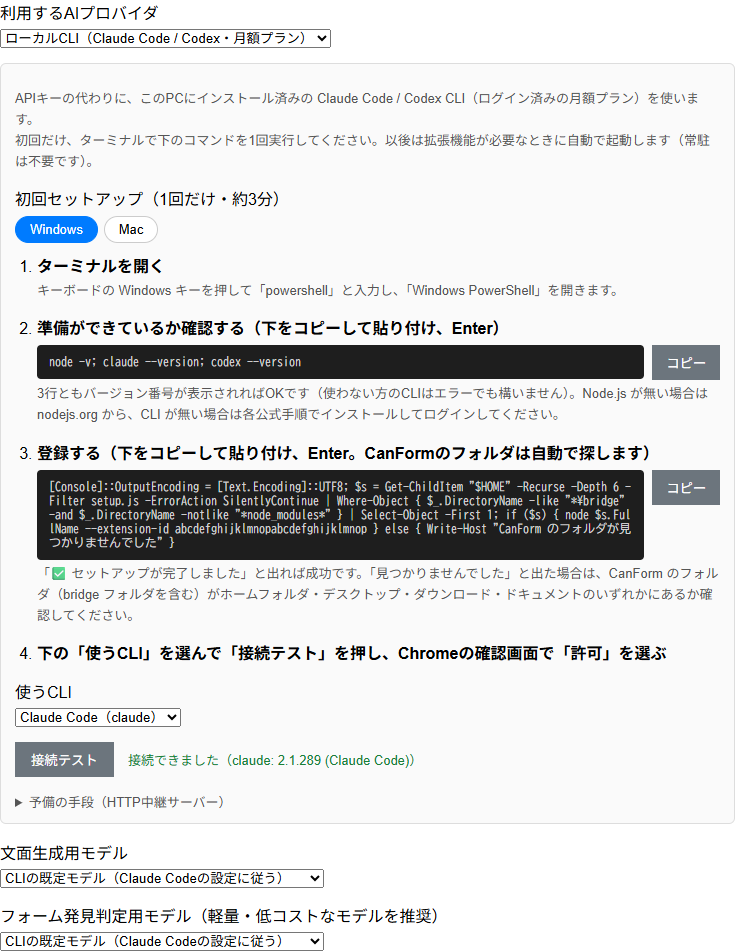
Autonomous outreach and form filling now use your local CLI for AI.
Choosing models
The candidates for the message-generation model and the discovery model follow the CLI you selected.
| CLI | Candidates |
|---|---|
| Claude Code | CLI default, fable (Claude Fable 5.1), opus (Claude Opus 5.5), sonnet (Claude Sonnet 5.5), haiku (latest Claude Haiku 5.5), claude-haiku-5-5 / claude-haiku-4-5 (pinned versions) |
| Codex | CLI default plus the latest models in Codex’s catalog (GPT-6-Astra / GPT-6-Sol / GPT-6-Luna, etc.) |
The Codex list is fetched from the CLI on every connection test. CLI default follows the CLI’s own configuration (settings.json for claude, config.toml for codex). Discovery decisions are called often, so a light model (haiku or GPT-6-Luna) keeps things fast.
Costs and limits
- CanForm charges nothing extra. AI usage is counted against the plan your CLI is logged in with.
- Subscription plans have usage caps (for example, a number of requests per time window). Crawling several hundred companies in a day can hit the cap; the CLI then reports a wait time, and CanForm records the attempt as a failure in its log.
- Each call takes several seconds to tens of seconds, longer than the API. Calls run one at a time, so a full crawl takes longer too.
- Use of each CLI is subject to that service’s terms.
Troubleshooting
| Symptom | What to check |
|---|---|
| ”Cannot connect (Specified native messaging host not found)“ | The setup command has not been run, or was run with a different extension ID. Re-run the command shown on the settings page |
| ”claude not found” / “codex not found” | The CLI is not installed or not on PATH. Check that claude --version / codex --version work in a terminal |
| Generation fails with a message asking you to log in | The CLI is not logged in. Run claude or codex login in a terminal |
| It used to work but stopped | The CanForm folder was moved or deleted. Restore it, or re-run the setup command from the new location |
| Cannot connect on macOS | The browser was not restarted after registration. Quit Chrome completely and reopen it |
Where native messaging is unavailable, you can fall back to the HTTP bridge server (node bridge/canform-bridge.js), which works only while it is running. Open Fallback (HTTP bridge server) on the settings page to check the URL.
To remove the registration, run node bridge/setup.js --uninstall.